
Today there is one thing that seems clear from the data: operational priorities are changing and the emphasis on the rapid adoption of concrete technologies has increased considerably.
By Nick Morgan*
Along with the shift to IP and cloud architectures, as well as web technologies that have become essential guarantees against service disruption in on-premises operations (such as a global pandemic), technologies such as workflow automation are increasingly in demand. With more production staff working remotely and fewer staff in the office, production problems such as process bottlenecks are often more difficult to solve.
Add to this the desire of many companies on average to reduce costs to counteract market pressure from falling recurring revenue, and the obvious solution is to automate production processes and workflows to increase efficiency and reduce costs. Workflow automation is most often used to justify the expansion of linear or non-linear channels (OTT, VOD, social media) without incurring significant installation costs, as many of the preparation and delivery processes are automated. A greater number of channels usually means more effort and resources to produce and distribute new content.
Fitting the pieces of automation together
Workflow automation does not always require a MAM solution for operation. There are many types of workflow automation, some operate independently of MAM, DAM or PAM and others have close integration with these solutions, it really only depends on the desired application and whether the workflows are a production sub-operation or a part of a holistic content management and production platform. The latter is the main objective of this article.
So what are the benefits of MAM-based workflow automation? The main advantage is the ability to relate a company's media assets, users and related processes to third-party platforms, such as ingestion, reproduction, programming, delivery and also specialized processes such as quality control, publication, censorship and archiving. A good MAM solution can integrate all these systems, operations and business processes holistically, making it much easier to produce, manage and track medium- to large-scale operations.
MAM systems typically include integrated workflow engines, but they are usually sequential, i.e. one operation after another, and often do not allow manual (human) processes to be part of the workflow. Another type of workflow orchestration involves the use of a business process management system or BPM (Business Process Management), which is a more advanced solution for creating complex processes and sequential/parallel workflows that offer greater collaboration and visibility while reducing human error and duplication of tasks.
The workflow mystery tour
So, if you belong to a media company that has identified the need to automate many of the day-to-day production tasks and processes that consume human resources and often provide unsatisfactory results, then perhaps what you need is a well-designed automated workflow.
The input problem I often see is that there is a lack of internal expertise within media organizations in terms of workflow automation and MAM in general. I have to admit that it often looks like an art of magic and that it is very difficult to understand; first, it takes time and effort to understand how it works, and then how it might apply to your production environment. The possibilities when it comes to planning a workflow are seemingly endless, so where to start?
Well, before we start talking to the sellers, since each one sweeps for home, here is a basic guide on how to raise it:
Identify the specific areas where you want to improve your production processes, not just a general idea of the type "we want to improve our workflows", but delve into the points where you know things are not working so well and point them out as problem areas.
Read, read and read as much as you can – The more you read, the more questions you'll have, and that's good. There are no silly questions, I ask them constantly (you just have to ask my colleagues), it is the best way to learn quickly.
Look for some non-vendor experts – There are several out there who may have had local experience in workflow automation and may be willing to share their experience or difficulties. Listen to their difficulties in particular, as they tend to provide more information to the inexperienced. There are also workflow experts that you can locate on social platforms like LinkedIn, or you can ask through IABM or similar organizations. Many of these people will be happy to share their knowledge and experience with you.
Hire a consultant – If your company is willing to get it right and not rely on technology providers to guide them, they should carefully consider hiring a reputable workflow consultant. Yes, there are people and companies that make a living from it and that remain impartial about brands.
Create diagrams and diagrams of process stages – I love it when clients are presented with workflow drawings, perhaps because I orient myself better visually, but also because the best way to understand a process or workflow is to "map" it.
Look for vendors with real solutions and workflow automation expertise that can provide you with case studies and references. Start by requesting a 90-120 minute demo and ask questions... Lots of questions!
Finally, select and hire the company or companies you think you can work with, share your sticking points from step 1, and ask them to provide you with some tangible ideas on how to approach your business and workflow goals. Beware of any vendor who doesn't ask questions or say they need an order or a firm commitment before allocating the resources to work on your problems. If this happens, they either lack sufficient onboard experience or are not prepared to perform the necessary fieldwork without an exclusive commitment on their part, but ultimately, it is your decision.
Let the magic of workflow design begin After following the previous practical 7-step plan, you will have already understood that applying the change of workflows to your environment is going to be a considerable effort. There should also have come a point where you have clearly identified the vendor that you think has the experience, knowledge of the subject, and the solution needed to meet your requirements. It's at this point that things really get going.
You've committed to working with the supplier and hopefully he's committed to working with you too. It's time to apply the collective knowledge of all stakeholders in the project to start creating the new workflows.
Keep in mind that, unlike other technological solutions such as playout automation or BMS, there is no "meet specifications and price and it's over" approach, workflow design involves all stakeholders, or at least it should. I am very much in favour of round tables to start putting together the puzzle with collective input. Someone has to lead, sure, but when a change is made across the organization, everyone has to be heard to be successful. I've often had twenty people on a video call, and if meetings are well structured, great ideas can emerge from each individual's perspective.
Key elements of designing an automated workflow
BPM and MAM workflows incorporate many elements, but the ones you're most interested in are the user-oriented elements. These are usually divided into seven main areas:
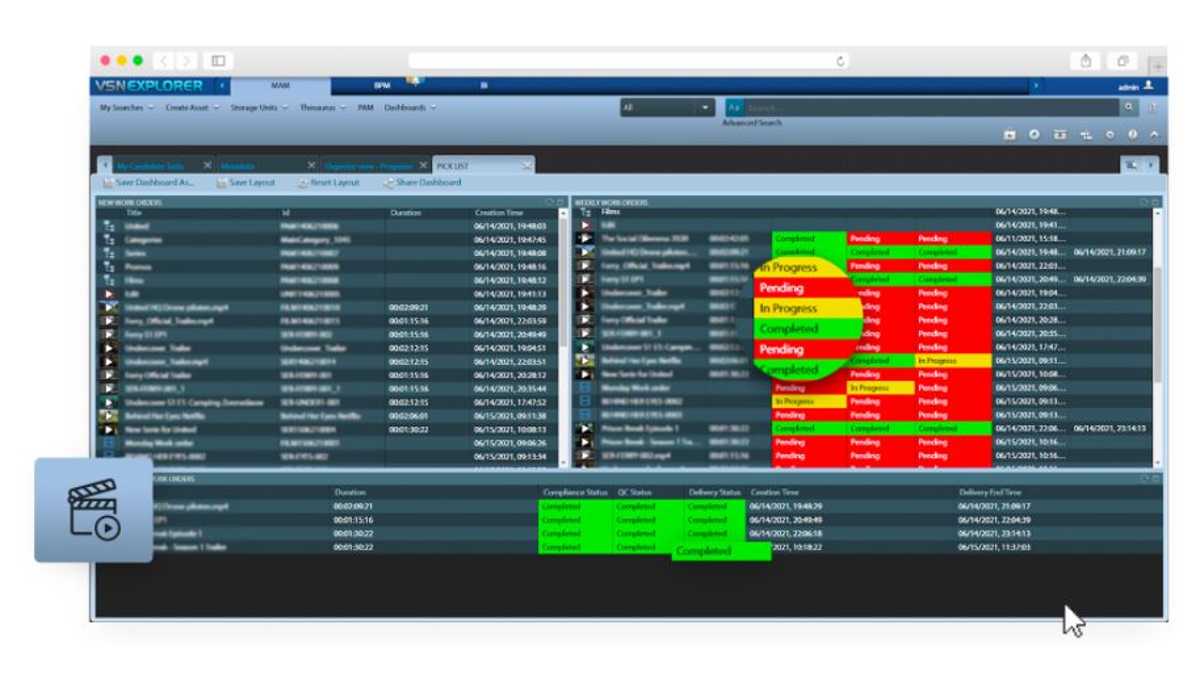
1. The BPM Workflow Design Tool – Here the scripts are written and rendered visually, something like a flowchart. This is your workflow "map," and many of the individual processes that make up the workflow are contained as code within these interconnected sections. Once you are familiar with this, everything starts to become much clearer.
2. The MAM assets page: here the original media and all production, final or publication versions are stored in what we call "Container Assets". Media assets must be stored and managed in a logical way, with specific metadata associated with it to easily identify each stage of the production process.
3. Candidate task list: This is the list of tasks that must be completed before the final delivery or publication stage. It lists all the tasks and allows you to assign specific operators to each of them.
4. Custom drop-down menus or compliance checks: If you're working with manual review and approval steps, such as visual, compliance, or censorship quality control, very often the best approach is to create a custom metadata field that is used to add annotations or includes a drop-down menu with predefined options that, once changed by a user, they automatically trigger the next step in the workflow.
5. Preparation and delivery: All your work to date, including automated tasks, will end up in the delivery phase. Here are the key parameters that determine how a video is published and where. The example below is for digital delivery, but it could easily be a local or cloud playout server.
6. Summary dashboards: If you have internal managers or external clients who need access to specific information at key stages of the workflow, probably the last thing you want to do is give them direct access to the MAM. Ideally, export the reports in common office formats, such as PDF or Excel, or, if your system is ready, present a web page with a summary of the production status. If your MAM dashboard is more advanced, it will allow these managers to interact to give their opinion or final approvals from the client or manager.
7. Notifications: They are typically a key component of workflow orchestration whereby multiple people are notified via email about a specific production stage and their role in the next stage of the process.
Offline design vs. Live Design – A New Approach
The typical way many MAM vendors create workflows for their customers is by building them "Offline" (sometimes onsite, but mostly at company headquarters) and when applied to the MAM system, they allow users to test these workflows and give feedback. While it is true that this works, it can be a slow and arduous process. Very often, there are things that were overlooked in the early stages of design and that need to be adapted later to fit a new thread or task.
The oflline design can take many weeks or months to complete and the results are usually not ideal. This is one of the reasons why some broadcasters are not satisfied with their automated workflows and this strains the relationship with the provider, as the final approval of the system goes on too long.
A new approach that has been tested and applied very successfully recently by VSN (largely due to the global pandemic) is the idea of "live design". It starts as an offline design process, but key moments, key users, and the provider come together in a series of video conferences (Google Meet, Zoom, etc.) to fine-tune each individual process and modify the various stages of the workflow.
This approach tends to get very fast results, as all complicated details can be solved live and actions, metadata forms, and processes are created and modified in real time along with the vendor's workflow designer. It is necessary to have a MAM solution (and a vendor) that allows for this type of design approach, but if you have it, there are very clear advantages, such as stakeholders being fully involved, design deadlines being shortened, and UAT (User Acceptance Testing) signatures becoming virtually redundant. since the final design already meets all or almost all the requirements.
With a Little Help (from your peers)
If you've somehow made it to the finish line and still smile, there's one key piece of advice I need to share that could make the difference between success or failure in a workflow automation project, and that's so-called change management. It's often overlooked, and it's the act of involving people in the change process in the early stages to ensure they are equally involved in making everything work better. If they don't get involved properly, people tend to go back to old ways and this will spell disaster for your project. Getting everyone involved from the start and having their input directly influence the final design of the workflow is the most effective way to ensure project success.
Keep in mind that workflows are constantly modified or improved over time. To prevent the final approval phase from becoming the last time you hire your vendor or vendor, always make sure your annual support or SaaS agreement includes a set number of design hours per year to ensure their needs can be properly addressed.
Hopefully all of this will give you a clearer idea of what it takes to implement automated workflows that can improve production processes, increase efficiency, and reduce production costs in a quantifiable way. It doesn't have to be such a long and tortuous road, but if approached in the right way, the journey can even be fun... Why not start now?
*Nick Morgan, APAC Sales Director of VSN