
 Responding to the request of our readers about the management of their digital files through the MAM, we will expand the topic in parts. In this first installment I will talk about the way you ingest or capture the material in your system.
Luis Pinto*
The first step is a seemingly simple decision, however it is the cornerstone that will define your initial and future purchases: in which codec you will handle your files. This depends on how much money you will have to invest in your general systems, and in the particular ones that are related to the MAM. What comes next, we describe below in general terms.
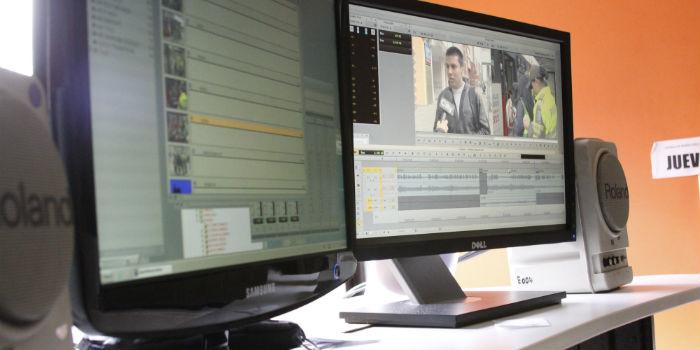
To develop this work it is necessary to have a desktop software that does the capture, transcoding and a multimedia streaming, in such a way that it allows the ingestion and import of content from various sources and formats. It should be a very easy to use software, which displays in an interface amicably, all the controls and windows necessary for manual operation.
I consider it important that the software you choose allows you to do these things:
1. Capture without image loss (talking about size, quality and bitrate).
2. That the capture and streaming begin instantly after starting it.
3. That it does not require any activation period, nor caching, nor image losses.
4. And last but not least, it should be fully stable in continuous operation, 24 hours / 7 days.
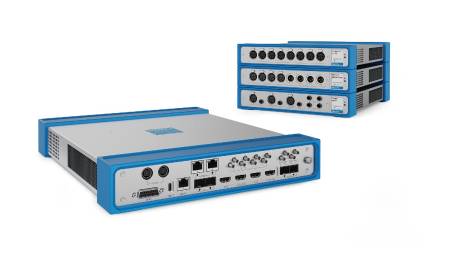
It is very important for the proper handling of your files, that the ingest equipment is compatible with the various formats and allows the connection to the wide variety of inputs, (analog composite signal, component, HDMI and HD-SDI) since in the real world we find a universe of connections, coming from the capture cards of the main manufacturers, to name a few; AJA (Kona 4G, 3G, LHi, LHe), Blackmagic Design, Matrox and Deltacast, among others.
Each of these cards allows us to handle file formats such as: MPG, M2P, AVI, F4V, MXF, MOV, XDCAM, MP4, MPEG TS, WMV, P2. Video codecs: Apple ProRes, Avid DNxHD/JFIF, MPEG-2, DV, DVCPRO, DVCPRO50, DVCPROHD, Uncompressed, H.265/HEVC, H.264/AVC, AVC-Intra, IMX, VC-1. Audio file formats: WAV, M4A. Audio codecs: PCM, AAC, WMA. Transmission formats: WMV in mms, H.264 or MPEG-2 as TS in RTP, UDP, RTMP. Your equipment must be compatible with the technology you already have or want to purchase.
We must also look for it to be compatible with Directshow cards or webcams; as an alternative and solution to the new ways of consuming video (OTT), since users must be able to record and retransmit directly from an IP transmission.
The efficient use of resources is key to the performance of your program, regularly this was provided by high-end dedicated video capture servers, but today there are native OSX or Windows 64-bit software that have nothing to envy to these large and expensive computers. However, it is important to keep in mind that a low-performance hardware equipment will not cover the needs of a heavy work, that is, demanding in terms of intake channels, data transfer speed, and durability in working time.
Keep in mind that the equipment you plan to buy or acquire must be in service for at least 5 years, before it begins to require any type of spare part or technical service; this, in general terms, is defined as purchase projection. We find INGEST equipment that can capture as many Full HD or SD video inputs, as cards available in the station or ingest stations. There are functions that are very useful, depending on your operation, I clarify, do not buy what you are not going to use but project your purchase according to your future needs.
At times your ingestion system will not only replace an entire rack of VTRs, but it will also be able to offer you much greater codec versatility. In the same way, its ability to save files directly to the network storage system and integrate with audiovisual content management (MAM) systems will bring you enormous advantages for workflows.
Basically there are four scenarios where this type of software is required, it is key that you identify with them:
1. Work in TV studios: Users are responsible for capturing on the fly and recording the signal of live cameras; this allows technicians to start, pause, stop, and split specific channels or all channels at the same time.
2. Scanning and Archiving: The equipment connects with a videotape recorder (VTR) and allows you to define entry and exit points to make a batch capture. Users can re-record a video file to tape in the same way. Let's understand that it is material from a tape.
3. Scheduled recording: Recordings can be programmed or even controlled by commonly used video routers (AJA, Harris, Kramer, Blackmagic, Quartz, Jupiter and Snell), IN/OUT rooms, signal monitoring rooms, news centers, etc.
4. Legal copying and monitoring: Capture of live broadcasts from DVB or IP sources. Where the equipment supports EPG extraction (electronic program guides) and allows you to create a schedule with the result.
Multi-channel recording can generate a huge amount of files. The ability to control those files is what I call an audiovisual content management. That files can be assigned a name automatically through user-defined name templates, is something very valuable at the time of its management, find out this well before getting into an INGEST program.
In the midst of this whole process, you or your team may realize that what was previously outlined as an appropriate plan, falls short in everyday reality and that is the precise moment in which you have to simply grow. Never stop thinking that this process of putting everything under the tutelage of a MAM, involves regular activity in front of your files and how you store them.
If your operation requires this type of program, user profiles and project files should be saved with certain system settings, so that you do not have inconveniences.
Consequently, any user can receive training to use it without difficulty as a stand-alone system. It is important that all actions can be recorded and critical operations can be password protected. MAM software should allow remote control and monitor of all workstations on a local network. To achieve this integration, an API (Application Programming Interface) based on TCP/IP can be available.
File processing is a key component of the system and integrates the following functions:
• UP/DOWN Convert rescaling (changing aspect ratio and resolution) from input signal/file to output file/transmission
• Multi-capture audio and streaming from an SDI or TS source
• Reallocation of audio channels
• Subtitling from input to file or stream
• Recording VITC/LTC on file, and detection of timecode hops
• Overprint logo, text or time in the file
• Recording to a network location with local cache
These are somewhat advanced options for content management that require workstations for the retransmission of signals in different scenarios with different characteristics, I explain, a chain of channels transmits from the same point for America in general, so it must emit the same video signal with audios and subtitles according to each country, or the diverse ability to combine according to the will of the end user, (example: I listen to it in English and I want it with subtitles in Spanish or Portuguese).
Even if you only think about organizing and classifying your file... catalog it and add metadata, suddenly put closed caption, subtitles, tags, make it accessible on-line, or for that daily reason of having it available and at hand for access to editing rooms or to reissue it, choose a product that suits your needs and budget. What decision you make today will depend on what you need to do to complement your system and improve the IT environment for the MAM.
To conclude this delivery, your intake system must be characterized by its quality, accuracy, responsiveness and reliability. I evaluated your options under these criteria and you will certainly find the equipment to suit you and budget.
Note, for the preparation of this writing, I refer to the following portal: http://www.metus.com/metus-mam/
* Luis Pinto is an advisor to TVyVideo+Radio magazine.