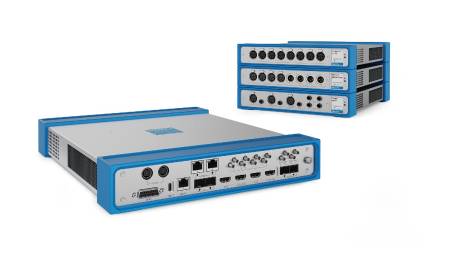

Sony presents the new MPE-200 multi-image processor that rectifies the different position and adjustment errors that arise when using two cameras to produce 3D content. The processor improves the efficiency of procurement and production operations.
MPE-200 operates in combination with sony MPES-3D01 software for stereoscopic image processors and the MPES-3D01MP media package.
According to Andrew Nelles, Sony's marketing manager, "Most 3D films use two cameras attached to equipment that allows one camera to capture the view perceived by the 'left eye' and the other the one perceived by the 'right eye'. The key to successful results is in the correct position and adjustment of the cameras, followed by the appropriate correction of the content after capture. Using the high-performance, state-of-the-art microprocessor Cell Broadband Engine (Cell/B.E) during the capture phase, the MPE-200 can detect, analyze, represent and correct the different adjustment errors that may occur due to the high-speed process, for example the mismatch of the optical axes, the inconsistencies of chromatic adjustment, and others".
The MPE-200 can also convert the results into different formats ready to be transmitted, for example the collateral format or the up and down format, combining both views and broadcasting them as a single 3D signal.
Use a high-performance Cell Broadband Engine (Cell/B.E.) microprocessor to quickly analyze position and adjustment errors – such as color disparities and axis mismatch – between the two cameras used for 3D capture. It can also be used to reverse the mirror image when capturing with a system of equipment equipped with semi-mirror. These different features facilitate the quick and effective adjustment of the cameras in the capture phase, and allow other image corrections to be made once the capture is complete.
Likewise, the MPES-3D01 stereoscopic image processor software allows you to control several multi-image processors from a conventional Windows computer. Each multi-image processor represents actual images from the camera with waveform data indicating alignment and mounting errors. The user can use that information to identify problems, and can easily correct them by changing the parameter values on the computer while viewing the GUI. The user can capture 'snapshots' of frequently used settings and save them in a 'box of shots' that can be re-invoked as required.
It can also convert and output 3D images in appropriate formats for monitoring and transmission. For example, you can send to a monitor images arranged collaterally or arranged up and down, or you can convert them into an appropriate signal to be transmitted. You can also produce one of the images (left or right).