
Many users of digital camcorders wonder why their "higher quality compact disc" audio signals sound like a downpour on a tin roof. Generally, these problems appear when using external microphones or mixers that in theory, should offer a significant improvement in the quality of the record.
Should we resign ourselves to the impossibility of recording good quality audio when using low-cost camcorders ? Not necessarily. But we must carefully follow the rules of the game and not expect the simple addition of a new toy to magically solve our problems.
Leaving aside the obvious problems of faulty connections and poorly made cables, the truth is that most audio problems in modern digital camcorders come from sharp variations in signal levels. And those variations can be controlled.
Why does it sound bad?
Click-through audio is usually caused by a very high level of signal entering the camcorder at the time of recording. Each pop represents a period of time during which the maximum volume that the recording system can handle was exceeded. Usually, these noises have a duration equivalent to that of a few digital audio samples, but their repetition makes them audible in the form of sizzle or crackling.
To avoid this type of noise you have to control the levels better before you start recording. This recommendation seems irrelevant if we talk about a scenario in which a microphone connected to the camera is simply used... but it usually happens that various problems in the selection of the equipment and in the connections, will generate inconsistencies in the signal levels, which will become noises and a tendency to saturate the audio easily.
We would all like to have the perfect camcorder , with manual control optics and XLR inputs, but there is another feature that is absolutely essential in a camcorder for professional use: audio level indicators, either in the camera body or in the viewfinder. And it goes without saying that every camcorder should be accompanied by a good pair of hearing aids.
Choose a microphone
Definitely, the first step towards increasing audio quality is to forget about the camera's microphone. That's why almost all videographers with some experience try to connect an XLR microphone to their camcorder by making an adapter cable. And in most of these cases the experiment does not work. Why? Because the microphone inputs of small digital camcorders are not compatible with such a microphone even in cases where the adapter cable is well made by properly "unbalancing" the signal, for example.
Most camcorders have microphone inputs with a non-standardized impedance. In Spanish, this means that the electronic characteristics of the circuit that receives the signal from the microphone do not correspond precisely to the characteristics of a professional type microphone. And the signals generated by a good quality dynamic microphone may be too high for the camcorder perhaps not loud enough for the audio to be heard badly all the time, but strong enough to saturate easily.
In other cases, the peculiarities of the camcorder – which may have been designed to use stereo microphones, strange connectors or just condenser microphones – mean that any attempt to connect a regular microphone results in noisy signals or clear reception from FM stations.
Do not rule out the option of using the "toy" microphones proposed by camcorder manufacturers as accessories for their equipment. The costs seem high in some cases, but their performance is surprisingly good... although sometimes they are abysmally bad. It is also worth reviewing the offer of low-end wireless microphones, as some models have the option to adjust to the mysterious mini connectors of the most popular camcorders .
... and then connect it well
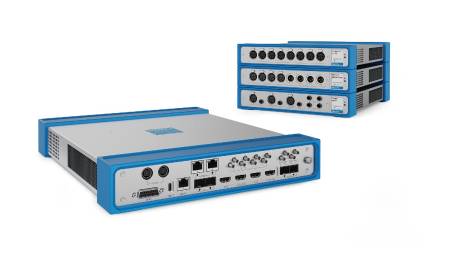
Either way, it will always be better to use good quality microphones. Thinking about those who decide to go that route, several suppliers offer XLR adapters designed to correctly attach professional-type microphones to low-cost camcorders . We are talking about metal boxes that are screwed under the camera and deliver the signal through a cable with a mini connector. In some cases, these adapters include potentiometers that allow you to adjust the level or make mixes with more than two microphones.
As many videographers have discovered, the output wire is the weak link in the chain. With some frequency accidents occur in which the box that can weigh about 400 grams is hung from the mini connector... with the effects that can be expected in these cases. Usually, after three or four connector changes it is necessary to replace the cable, which constitutes a really uncomfortable repair.
A point against these adapters is their size. Generally, weight is not an issue, but when we try to use one of these boxes under a passport-type camera, we will understand why some people do not support them.
Either way, these adapters are a proven and attractive solution when only microphone inputs are available, although their cost (around $200) may be too much for an amateur or for the operations that have been forced to adopt the simplest camcorders . Seen another way, an adapter can become an interesting investment by improving the audio record of almost any cheap camera.
It is possible to build an XLR adapter in a few hours with some easy-to-get components, and the information to do so is available on the web... but the impedance and configuration data of the camcorder connectors are not so easy to find. Whoever decides to follow this route can achieve favorable results but must prepare for a long process of calibration of levels by trial and error. Is it worth it? You decide.
The Automatic Enemy
Following the tradition of home audio and video equipment, the vast majority of low-cost camcorders incorporate an automatic gain control system or AGC, which supposedly makes it possible for an inexperienced user to obtain recordings with consistent levels. In the real world, AGC systems are responsible for many audio problems related to signal levels.
What does the AGC do from a digital camcorder ? It basically increases the level of the audio signal when it is very low, and lowers it when it is very high. This sounds perfect... except that in practice the implementation of an AGC circuit in a domestic camcorder is done with three or four electronic components that are put in line with the signal input... and that's it.
When the AGC increases the level of low signals, it also increases the level of noise accompanying those signals. And when the level of high signals drops, in many cases it generates audible defects, very similar to those that occur when a signal becomes saturated in an analog environment.
Without going into too much detail, it's best to assume that a good quality AGC system (pretty hard to find, by the way) can do the good job of "waist-tucking in" the levels of an audio signal... but it also tends to increase noise and decrease the available dynamic range: if sudden level increases are going to produce an unpleasant sound, it is better to leave the volume down.
How do you hear sound altered by an AGC circuit? It varies very little. It's boring, it feels like an amplified murmur. And when the level drops, you feel the noise input. A hint: When a good properly connected microphone starts to sound similar to the camera's microphone, it's quite possible that the AGC is doing damage.
The truth is, the AGC circuit of a simple camcorder cannot be expected to do a reasonably good job. Does it make sense to let a 4-cent capacitor adjust the level of your audio signals?
This leads us to propose another desirable feature for a camcorder for professional use: the possibility of deactivating the AGC and controlling the levels of audio recording.
Using mixers
A compact mixer is an excellent resource for ensuring audio quality. It usually includes a signal meter whose performance must be carefully compared with that of the camera to make it a really useful tool. And when the camcorder has line inputs (and can also use them simultaneously with the camera), a mixer replaces an XLR adapter with advantage.
What is the most important thing when deciding to use a mixer? Although it seems absurd, the most important thing is to avoid making mixtures. When only two microphones are operated, this is no problem... a good stereo mixer will allow you to route a microphone to each channel and control the levels independently. It will always be better to leave the problem of mixing to post-production.
On the other hand, a mixer allows to manipulate the signal levels to achieve a significant decrease in the harmful effects of AGC systems. If we keep the high parts of the signal at a point that does not reach to trigger the limitation functions of the AGC and at the same time prevent the lower parts from becoming inaudible, we will very possibly be able to reduce the noise and record more intelligible voices.
When it is necessary to use more than two microphones we face the need to mix "hot". The bitter experience of many novice videographers leads us to make a recommendation: when it comes to live mixes or multi-channel registration, it is best to hand over the work to a professional.
An attractive option for some is to register four channels at once, reducing sampling to 32 KHz/12 bits. Before committing to this work system, carefully evaluate the quality of the record and check if your post-production system can handle the recorded material under these conditions. Do not forget, in addition, that we talk about "hanging" even more cables on the camcorder, and that is always a problem.
And this is one of the most important lessons for users of digital camcorders : you have to simplify. If the work can be done with one or two microphones, it's best to leave things that size. When audio equipment becomes a hindrance, it's time to reevaluate things. We must not forget that mobility is the greatest strength of small cameras and, therefore, sometimes, only sometimes, it may be convenient to reuse the camera's microphone.