
TV&Video: How do you define a digital workstation for audio?
José "Chilitos" Valenzuela
: It is the one in which the user can have random and fast access to digital information, either audio or video. With a season of this nature there is no limit to creativity, of course, without counting all the time we save to finish a job.
TV&V: What is the importance of having a digital audio post-production station for the sound work required in the audiovisual industry?
JV: It's very important, as technology continues to advance by leaps and bounds. It is no longer a luxury but a necessity to have a workstation of this type especially if the DVD becomes a standard in the audiovisual world whose sampling speed is 96kHz and its resolution is 24 bits.
TV&V: You were participating in the development of Pro Tools, what can you tell us about the conception of this system, perhaps the most used and recognized in the industry worldwide?
JV: When we developed this system, I knew it was going to be successful, but not the one it has had so far and I also didn't think it would become the standard of digital audio post-production worldwide. The time I worked on the development of this system, it was still "in its infancy", the version of Pro Tools III / TDM (Time Division Multiplexing) that was the one that revolutionized the digital audio industry was not yet launched. Without the implementation of TDM it was impossible to use processors or DSPs in real time, which are now known as Plug-Ins. At the same time that Pro Toos III/TDM was being developed, I started working on the SampleCell sample player to work in the TDM environment together with Pro Tools III. It was a great experience and I am proud to have participated in the development of these systems, especially being Latino. Now I use it every day as if I were driving my car to go from my house to my studio, it's part of my life.
TV&V: What is the essential purpose of these sound post-production systems?
JV: I think the purpose is to work faster and get a higher quality than you get with any other analog system. With such a system one can be very creative when it comes to sound and implement that creativity to get even more interesting and innovative results.
TV&V: What are the main resources of ProTools?
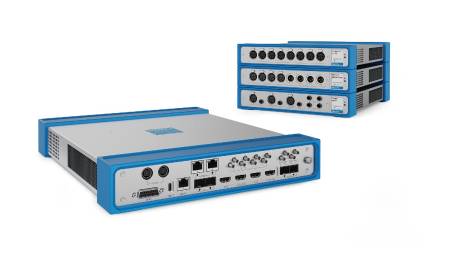
JV: In principle, if one wants to work on a Pro Tools 5.0 system one must choose the platform, that is, which computer is going to use: Macintosh or PC? If we opt for a Macintosh, the necessary requirements for the optimal operation of the system are the following: the computer must be of PCI architecture (Power Mac 9600 among others, G3 or G4) of at least 350 to 450 MHz clock speed. The operating system must be MAC OS version 8.6 or 9.0. A Digidesign-approved SCSI external drive must also be purchased to store digital audio; if they want to work with 64 tracks, they will need to install at least 192 MBytes of RAM on their computer and if they occupy only 32 tracks, 128 MBytes will be enough. They also need to install a Digidesign-approved PCI SCSI accelerator card on their computer for better system operation. If you want to work in the PC world, the processor must be Pentium II -- III with the Windows NT Workstation Version 4.0 operating system. A Digidesign-approved SCSI external drive to store digital audio; if they need 64 tracks for their projects they should install at least 256 MBytes of RAM and if they only want 32 tracks, 192MBytes are good. If you are considering buying a Pro Tools system you should know which one is appropriate for each as there are several versions that differ in the number of chips or DSPs. For example, if it is Pro Tools 24 Mix, it will include 6 DSP chips (a PCI card) and Pro Tools 5.0 software . On the other hand, if you buy the Pro Tools Mix 24 Plus, you will get two PCI cards one called Mix Core and the other Mix Farm, each featuring 6 chips and Pro Tools 5.0 software . As you can imagine, the more DSPs they possess, the more power and speed they will have. Finally, whatever system they purchase and the computer they use, they will need an audio interface like Digidesign's 24-bit 888 I/O or the same company's 20-bit I/O 882 I/O. These audio interfaces are what convert analog signals to digital and vice versa.
TV&V: What kind of specific tools does this application offer for sound work dedicated to television and film production?
JV: This system can work with any format they want, whether linear or non-linear. For the work of recording, ADR, sound editing, music editing, sound special effects design, mixing, automation and mixing 5.1 Surround, Pro Tools is an excellent and very flexible tool. Among other specific tools that you can count on in the world of Pro Tools are: the software called PostConform (Digidesign) with which you can import your EDL list and make the lines of dialogue and sounds are captured and placed according to the images of the movie or program automatically, without having to entertain yourself for hours doing it manually. Other software of this nature are Synchro Arts' TITAN and WildSync's Tape. Another tool is Digidesign's DigiTranslator software , with which you can exchange files bidirectionally between Pro Tools sessions and OMFI files. If you are working on an ADR session, Synchro Arts' VocAlign software will help you place the dialogue you are recording with the "guide dialogue" in perfect synchronization without guessing whether or not it is well placed, thus saving quite a bit of time, "and as time is money.." If you're designing the effects for a movie and need to look for the appropriate sounds, Gallery's SampleSearch is the solution. This software will help them to find very quickly the effect they need. The company also includes CDStudio software with which you can import sounds or music from a common audio CD via your computer's CD-ROM. And if you're mixing in 5.1 Surround, I recommend purchasing SmartPan Pro software from Kind of Loud Technologies to easily control the direction the audio will power the speakers. In addition to all these applications, Pro Tools has internal real-time processors (Plug-Ins) and non-real-time processors such as the AudioSuite that can change the sound speed making it shorter or longer without altering its tone; or to increase the volume of a sound that was recorded to a low level. As you can see, there are several good options in Pro Tools to work quickly and efficiently.
TV&V: How did the evolution of these workstations transform the sound working model?
JV: This evolution forced users to work totally differently than they were used to with linear systems. That time waiting for the return and advance of the tape, the time to synchronize the audio and video, load the correct sound effects and EDL lists, etc., no longer exists. Now with access to so many types of systems and applications, everything is almost instantaneous and with better sound quality.
TV&V: What is the ideal workstation for you? What kind of resources should you have?
JV: In addition to everything I mentioned above, it would be essential to acquire instead of a single monitor for the editing window, a second monitor to be able to place the Window of the Pro Tools mixer, a controller to manipulate the internal faders of Pro Tools and be able to mix more comfortably, whether it's Digidesign's Pro Control, JL Cooper's CS10, Digidesign's Motor Mix or Mackie's HUI. Likewise, a good card to capture video and its respective memory for video, a good file (library) of sounds such as Sound Ideas or Hollywood Edge. A couple of audio monitors like the Genelec, PCM, KRK especially if you are going to mix in 5.1 Surround. An SMPTE to MTC synchronizer/converter, a MIDI interface for the Pro Tools controller and/or synthesizers and samplers for sound effects or also to control via MIDI Machine Control modular digital recorders such as the Tascam DA-88. An interface card to control with Pro Tools via Machine Control linear systems such as a Betacam or a 3/4" VTR such as the Sony U-matic.
TV&V: Do you give the other half of the audiovisual language to the sound treatment in a film or TV production?
JV: I definitely don't understand why audio isn't given so much importance, especially in a TV production. I come from the world of professional audio and for me it is incredible to see images, movies or programs without a good sound quality and a good mix. I don't quite understand it.
TV&V: What is your advice to those working on such a system?
JV: The first thing is that they train in the system they are using whether or not pro Tools is pro tools and take advantage of it as it should. This way, they could be more creative and get better results. If the company where you work does not sponsor your training, then I recommend that you do it on your own, since that experience is for you and you can apply it in other places where you can continue to advance professionally. There is a lot of work "out there" and if they are not prepared, they will continue in the same way, "yes you can"!
Note:
José "Chilitos" Valenzuela is a recording and mixing engineer, based in Santa Monica, California and is the Director of AudioGraph International, a digital audio and Pro Tools training center that offers classes in Spanish and English. He can be reached at (310) 396-5004, fax (310) 396-5882, e-mail: [email protected]; or by visiting the websites: www.audiographintl.com or www.chilitos.com